I am in a development program new to the power platform space and need to create a word template and flow in power automate that populates the template like the below and converts to a pdf.
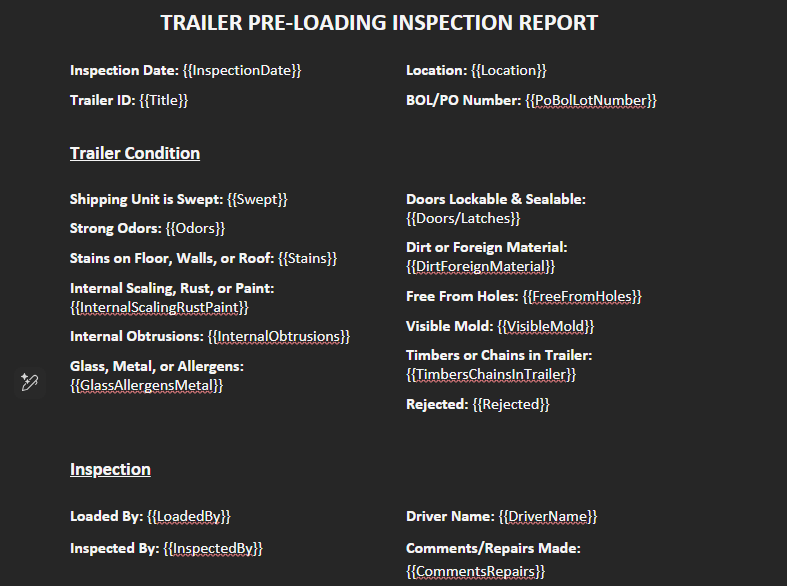
I am in a development program new to the power platform space and need to create a word template and flow in power automate that populates the template like the below and converts to a pdf.

Hello,
To achieve this, you will need to update your template using our Template Syntax. You can find more details here, including additional capabilities available - Template Syntax for 'Word - Populate' – Encodian Customer Help
For your example, the template tokens would be:
<<[Location]>>
<<[Title]>>
Your JSON data must then map to those tokens, for example:
{
"Location" : "UK",
"Title" : "TranerID"
}
After running the populate action, you can use Convert - File to PDF to convert the generated document to PDF. You can then save or create the output file wherever needed, such as SharePoint, OneDrive, or as an email attachment.
Additional documentation on Convert - File to PDF – Encodian Customer Help
We also have a blog article that walks through how to build a flow for populating Word documents. You can read more here - Populate a Word or PDF Document using Power Automate V2

Thank you so much!! What about image attachments? these records will have a minimum of 2 image attachments, but could have more.
Hello,
Images can be populated into a Word template, provided the correct template syntax is used. The required syntax depends on how the image is being supplied, for example as a Base64 string or via an image URL.
You can find further guidance here - Images – Encodian Customer Help