0

Populate word omits leading zeros for numbers like phone numbers

Hi all, 

I am trying to populate a word document based on customer data. One of the included information is a phone number. Users wont be adding a + or the country code infront and the phone number will start with a zero. I have only found formatting expressions for numbers, but not to actually pass a string.

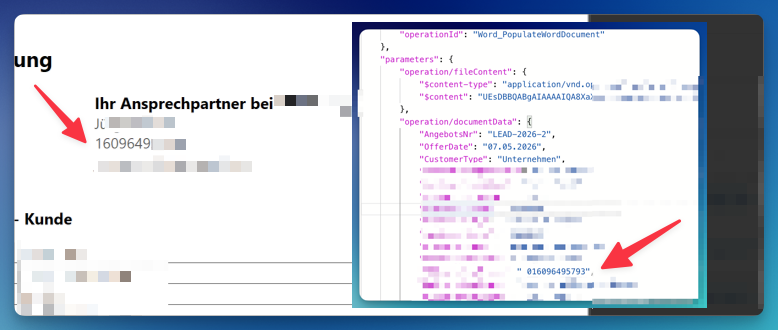
I have attached a screenshot of the action inputs from Power Automate and the populated document where the zero is missing. 
2 comments

  • Avatar
    Kayleigh Botfield Official comment

    Hello Robert Heep,

    This happens because the values are being interpreted as numbers rather than text, which is why the leading zero is removed.

    To preserve the formatting, you can change the JSON Parse Mode from Standard to Strict. This will treat those values as text instead.

    The main point to note is that, when using Strict mode, the data will be passed exactly as it appears in the JSON. In this case, that means the phone number will remain a string, including any leading zeroes.

  • 0
    Avatar
    Robert Heep

    Thanks!

Please sign in to leave a comment.