Hi,
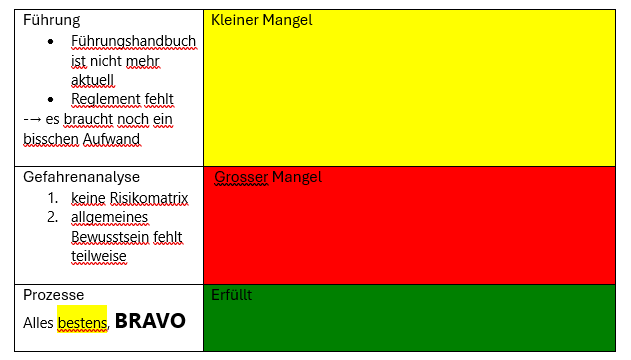
II am trying to change the background colour of an entire cell in a table in Word according to certain conditions. This only works for one of three conditions. For two conditions, only the background of the text is displayed in the selected colour, not the entire cell. See the screenshot below.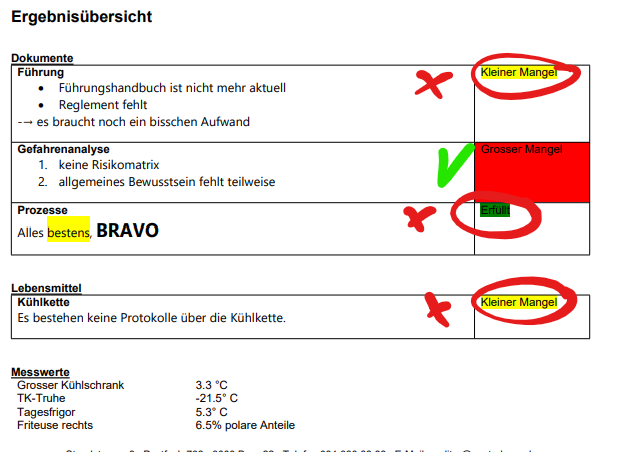
The JSON to produce the word document looks like this:
{
    "besuchsart": "Audit",
    "id": "54cba789-7689-f011-b4cc-002248db0075",
    "betriebsnummer": 4711,
    "betriebsname": "BSK003 XY ",
    "betriebsadresse": "XYZ",
    "besuchsdatum": "2025-12-18T15:00:00Z",
    "checklistItems": [
        {
            "beurteilung": "<div class=\"ck-content\" data-wrapper=\"true\" dir=\"ltr\" style=\"--ck-image-style-spacing: 1.5em; --ck-inline-image-style-spacing: calc(var(--ck-image-style-spacing) / 2); font-family: Segoe UI; font-size: 11pt;\"><p style=\"margin: 0;\">Alles <span style=\"background-color:#ffff00;\">bestens</span>, <span style=\"font-size:16pt;\"><strong>BRAVO</strong></span></p></div>",
            "kategorie": "Prozesse",
            "kapitel": "Dokumente",
            "ergebnisId": 963800000,
            "ergebnisText": "Erfüllt",
            "sortKapitel": 10,
            "sortKategorie": 30,
            "wert": null
        },
        {
            "beurteilung": "<div class=\"ck-content\" data-wrapper=\"true\" dir=\"ltr\" style=\"--ck-image-style-spacing: 1.5em; --ck-inline-image-style-spacing: calc(var(--ck-image-style-spacing) / 2); font-family: Segoe UI; font-size: 11pt;\"><ol style=\"list-style-position: inside;\"><li>keine Risikomatrix</li><li>allgemeines Bewusstsein fehlt teilweise</li></ol></div>",
            "kategorie": "Gefahrenanalyse",
            "kapitel": "Dokumente",
            "ergebnisId": 963800002,
            "ergebnisText": "Grosser Mangel",
            "sortKapitel": 10,
            "sortKategorie": 20,
            "wert": null
        },
        {
            "beurteilung": "<div class=\"ck-content\" data-wrapper=\"true\" dir=\"ltr\" style=\"--ck-image-style-spacing: 1.5em; --ck-inline-image-style-spacing: calc(var(--ck-image-style-spacing) / 2); font-family: Segoe UI; font-size: 11pt;\"><p style=\"margin: 0;\">zu hoch</p></div>",
            "kategorie": "Friteuse rechts",
            "kapitel": "Messwerte",
            "ergebnisId": 963800004,
            "ergebnisText": "Wert",
            "sortKapitel": 60,
            "sortKategorie": 50,
            "wert": "6.5% polare Anteile"
        },
        {
            "beurteilung": "<div class=\"ck-content\" data-wrapper=\"true\" dir=\"ltr\" style=\"--ck-image-style-spacing: 1.5em; --ck-inline-image-style-spacing: calc(var(--ck-image-style-spacing) / 2); font-family: Segoe UI; font-size: 11pt;\"><ul style=\"list-style-position: inside;\"><li>Führungshandbuch ist nicht mehr aktuell</li><li>Reglement fehlt</li></ul><p style=\"margin: 0;\">-→ es braucht noch ein bisschen Aufwand</p></div>",
            "kategorie": "Führung",
            "kapitel": "Dokumente",
            "ergebnisId": 963800001,
            "ergebnisText": "Kleiner Mangel",
            "sortKapitel": 10,
            "sortKategorie": 10,
            "wert": null
        },
        {
            "beurteilung": "<div class=\"ck-content\" data-wrapper=\"true\" dir=\"ltr\" style=\"--ck-image-style-spacing: 1.5em; --ck-inline-image-style-spacing: calc(var(--ck-image-style-spacing) / 2); font-family: Segoe UI; font-size: 11pt;\"><p style=\"margin: 0;\">Es bestehen keine Protokolle über die Kühlkette.</p></div>",
            "kategorie": "Kühlkette",
            "kapitel": "Lebensmittel",
            "ergebnisId": 963800001,
            "ergebnisText": "Kleiner Mangel",
            "sortKapitel": 20,
            "sortKategorie": 20,
            "wert": null
        },
        {
            "beurteilung": null,
            "kategorie": "Grosser Kühlschrank",
            "kapitel": "Messwerte",
            "ergebnisId": 963800004,
            "ergebnisText": "Wert",
            "sortKapitel": 60,
            "sortKategorie": 10,
            "wert": "3.3 °C"
        },
        {
            "beurteilung": null,
            "kategorie": "TK-Truhe",
            "kapitel": "Messwerte",
            "ergebnisId": 963800004,
            "ergebnisText": "Wert",
            "sortKapitel": 60,
            "sortKategorie": 20,
            "wert": "-21.5° C"
        },
        {
            "beurteilung": null,
            "kategorie": "Tagesfrigor",
            "kapitel": "Messwerte",
            "ergebnisId": 963800004,
            "ergebnisText": "Wert",
            "sortKapitel": 60,
            "sortKategorie": 30,
            "wert": "5.3° C"
        }
    ]
}
The template code in the Word document looks like follows. I have added some "comments" to clarify the code.
## This code is outside the table
<<foreach [kapitel in checklistItems.OrderBy(g => g.sortKapitel).GroupBy(g => g.kapitel)]>>
<<if [kapitel.Key != «Messwerte»]>>
<<[kapitel.Key]>>

## This code is inside the table, left column, works ok
<<foreach [kategorie in kapitel.OrderBy(k => k.sortKategorie)]>><<[kategorie.kategorie]>><<[kategorie.beurteilung] -html>>

## This code is inside the table, right column, background colour is only set correctly for the last condition
<<if [kategorie.ergebnisId==963800001]>><<backColor ["Yellow"]>>Kleiner Mangel<</backColor>><<elseif [kategorie.ergebnisId==963800000]>><<backColor ["Green"]>>Erfüllt<</backColor>><<elseif [kategorie.ergebnisId==963800002]>><<backColor ["Red"]>>Grosser Mangel<</backColor>><</if>><</foreach>>

## The following code is outside the table and creates another table (out of scope, works ok)
<<else>>
<<[kapitel.Key]>>
<<foreach [wert in kapitel.OrderBy(k => k.sortKategorie)]>><<[wert.kategorie]>>    <<[wert.wert]>><</foreach>>

<</if>><</foreach>>
Thank you for your help and best regards,
Daniel