0

PDF Merge Files Failure, Dataverse File issue that previously worked

Hello,

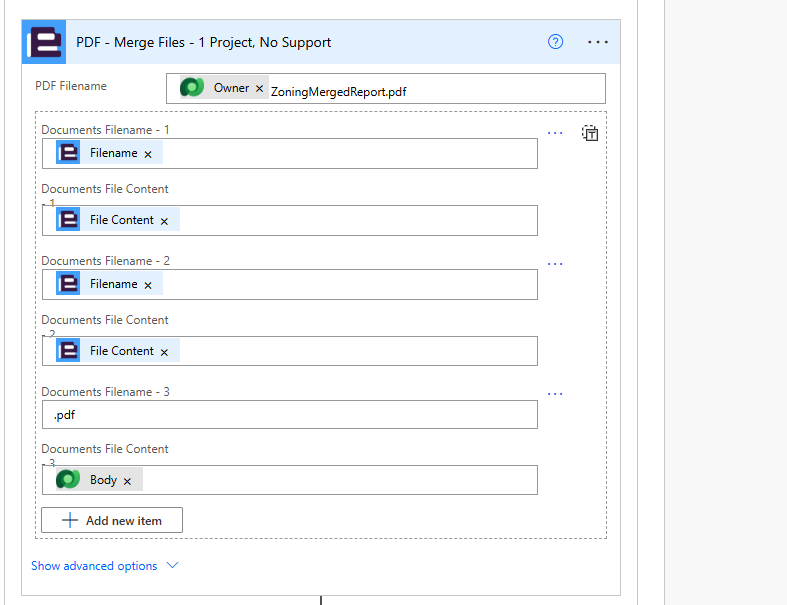
I am having issues using the PDF Merge Files action in Power Automate. I use this action in a similar scenario in another flow that is currently working, but it is a slightly older version from last year, before some recent updates. In this flow, I am attempting to merge some PDF documents (two documents generated in the flow and a Dataverse file uploaded into a Power App). The first two documents are not an issue in the flow. I've tested this by removing the Dataverse document, and the flow ran successfully. 

What do I need to do differently to get the Dataverse document to also merge successfully? Is there a bug currently with some version updates, since this was and still is working fine in other flows that I have using the same method?
Thanks for any assistance.

- Chris


1 comment

  • 0
    Avatar
    Kayleigh Botfield

    Hi Chris,

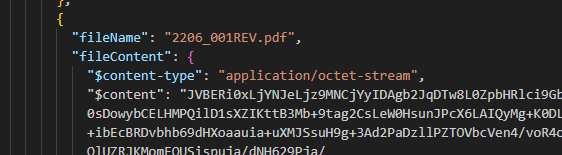
    The issue occurred within the ‘Merge Files’ action due to the way file content from Dataverse is structured. When adding file content from Dataverse, the payload is formatted differently. For example, your two PDF files appear in the following structure:

    {

    "filename" : "PDF1.pdf",

    "filecontent" : "base64 for the pdf here"

    }

    Further down, however, the Dataverse file content is structured differently, as shown below:


    By wrapping the Dataverse file content in a base64 expression, the merge operation functions correctly. I validated this using OneDrive—initially receiving a failure when the content was not wrapped, and observing that the JSON structures differed. Once the content was wrapped, the process completed successfully and the files merged as expected.

    I also tested merging two PDFs directly from OneDrive using the standard file structure shown above (without wrapping the content), and this worked without issue. Based on this investigation, the conclusion is that the file content must follow a consistent structure across all files being merged. Wrapping the content in base64 ensures that consistency and resolves the problem.

Please sign in to leave a comment.