0

Table iteration, table transpose operations

Hi Support, 

I have an issue with table rendering, I want to render dynamically table columns instead of rows,
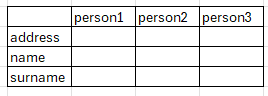
this is the result, and i want to add more columns based on the content of the JSON. From what i read in the documentation this scenario can't be replicated, also the transpose functionality is not available within powerpoint, making this not feasable. 

Do you have a way around it? 

What i was thinking about was to have a max number of people, hardcode the table let's say from person 1 to 5 and try to use conditional to not render let's say person 3 if it doesn't exist. 

and use a JSON structure like this one:

{
"persons":[
{
"person0":"address",
"person1":"person1address",
"person2":"person2address",
"person3":"person3address"
},
{
"person0":"name",
"person1":"person1name",
"person2":"person2aname",
"person3":"person3namr"
},
{
"person0":"surname",
"person1":"person1surname",
"person2":"person2surname",
"person3":"person3surname"
},
1 comment

  • Avatar
    Permanently deleted user Official comment

    Hi Mauro,
     
    Thank you for raising this with us and your patience while we have been looking into this for you.
    We have been doing research, looking into the finer details of the action and potential workarounds to achieve the goal you are looking for.
    Due to the limitations of how Tables are structured in PowerPoint there is no viable way to achieve this within PowerPoint itself.
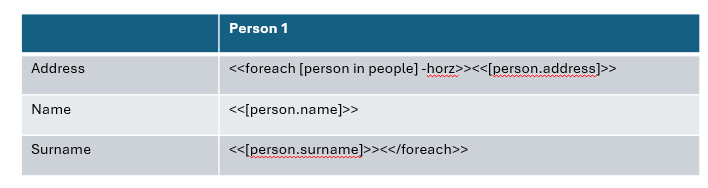
    The best way to achieve this would be using the suffix -horz after the array information in the first foreach tag as shown in the screenshot below.

    However, this will not work in Powerpoint due to the aforementioned limitations.
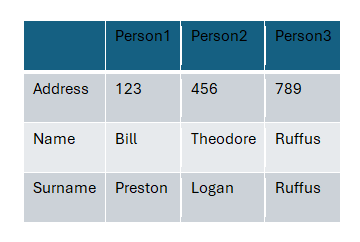
    We have tested this in Word which handles tables differently and the suffix of -horz does work in that application as you can see in the screenshot below.

    Unfortunately it is currently not possible to create tables in PowerPoint directly the way you desire.

Please sign in to leave a comment.