0

powerpoint - iterate to a group of slides

Hi Everyone, 

I'm trying to generate a .pptx from some dataverse data. The template will have 3 static slides (intro, data, data with a table repeater), and a group of slides for each component I'm pulling from a list. 

I'm not clear on how to define a repeater for a slide that contains a table and multiple additional slides.

{    
    "title": "example JSON",
    "elements": [
        {
            "images": ["encode64","encode64","encode64"],
            "name": "first",
            "tables": [{"name": "1"},{"name": "2"},{"name": "3"}]
        },
        {
            "images": ["encode64","encode64","encode64"],
            "name": "second",
            "tables": [{"name": "5"},{"name": "6"},{"name": "7"}]
        }
    ]
}

I would like to get out of this 3 initial slides based on "title" than a slides for each "elements", a slide for each image, so in this example will be 4 slide per element, one for the element and 3 for the images.

Reading the documentation  seems i would be able to repeat a slide or repeat a table and not both at the same time. 

Expectation:

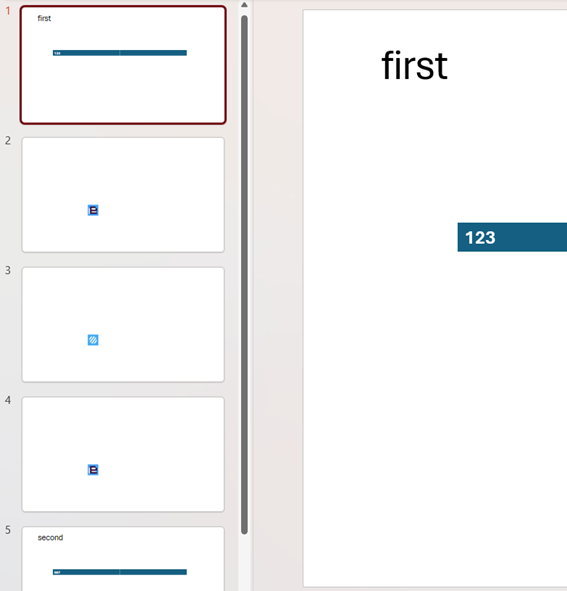
Slide1 Slide2 Slide3 (static) -> Slide4(first and containing a table with values 1,2,3) -> Slide5 Slide6  Slide7(each containing one of the images in the array) -> Slide8(repeat of Slide4 and containing a table with values  5,6,7) ->Slide9 Slide10  Slide11(each containing one of the images in the array).

Will I be able to achieve this?


4 comments

  • 0
    Avatar
    Mauro De Biasio

    I managed to get around it i can use more complex flows to generate only the slides I need then concatenate them in a bigger document. 

  • 0
    Avatar
    Kayleigh Botfield

    Hello,

    Glad to hear you managed to resolve this - For the benefit of anyone else that may ask the same question in the future, I am in the process of putting something together and doing some testing. Will share this here when I have more information on this for you.

  • 0
    Avatar
    Mauro De Biasio

    Hi Kayleigh, 

    I pretty much broke down the presentation in more editable bits, instead of passing a giant JSON and have sections to repeat, i render the presentation in blocks, i render slide 1,2,3 in the first part and write the file in OneDrive, I then render slide 4 and write it OneDrive, then i render slide 5,6,7 and write on one drive and i repeat for slide 8, then for 9,10 and 11. Once i have all the pieces together i merge them in a big presentation. The template for 4 and 8 is the same and the same is the one used for 5,6,7,9,10,11 that uses a compose with the property new slides set to "yes".

  • 0
    Avatar
    Kayleigh Botfield

    Hi Mauro,

    I believe you have taken the correct approach by dividing the presentation into segments and then merging everything together at the end. I have focused primarily on the tables and images within your request, as the first three slides—containing only the <<[title]>> tag—are relatively straightforward when using JSON input.

    I have configured two Populate PowerPoint actions: one for tables and one for images. Both actions have “Multiple Slides” enabled.

    Tables

    The first action (for tables) uses the JSON shown below.

    [{
    "name" : "first",
    "tables": [{ "name": "1" }, { "name": "2" }, { "name": "3" }]
    },
    {
    "name" : "second",
    "tables": [{ "name": "5" }, { "name": "6" }, { "name": "7" }]
    }]

    The corresponding template contains a single slide with a table and the following syntax, along with a <<[name]>> tag positioned above the table:
    <<foreach [t in tables]>><<[t.name]>><</foreach>>

    Images

    The second action (for images) uses the JSON displayed below.

    [
    {"images" : "base64"},
    {"images" : "base64"},
    {"images" : "base64}"}
    ]

    The associated template is also a single slide and contains the following tag:
    <<image [images] -keepRatio>>

    I used a Merge action and then configured the action to reflect the order of slides that I wanted to achieve the below. As you can see, the slides containing the three individual images appear between the slides generated for the tables.

    Edited by Kayleigh Botfield
Please sign in to leave a comment.