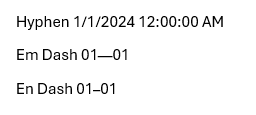
When passing a value such as "01-01" into a template it is converted to "1/1/2024 12:00:00 AM" on the template, the data is not intended to be a date and I need it to show as in the JSON "01-01"
Date
Votes
1 comment
-

Official comment There's a few ways this can be done i.e setting the "Date Time Formats" advanced option to disabled - although this will cause problems if you have dates that you need to format elsewhere in your document and may result in the need to format these outside of the template.
A good workaround is to switch the hyphen for an Em Dash (—) or an En Dash (–) using one of these means the value will no longer be seen as a date with no further need to change anything else.
JSON
{
"hyphen": "01-01",
"EmDash": "01—01",
"EnDash": "01–01"
}becomes
Please sign in to leave a comment.